![shelterbuddy_logo.jpeg]](https://knowledgebase.petloyalty.co/hs-fs/hubfs/shelterbuddy_logo.jpeg?width=65&height=65&name=shelterbuddy_logo.jpeg)
You will need access to Administration and Edit User Access menus to perform this action.
From the Welcome/Search page:
- Click the Administration menu
- Click Edit User Access
- From the User Access menu, select Manage Note Categories
- You will see a page that looks something like this:
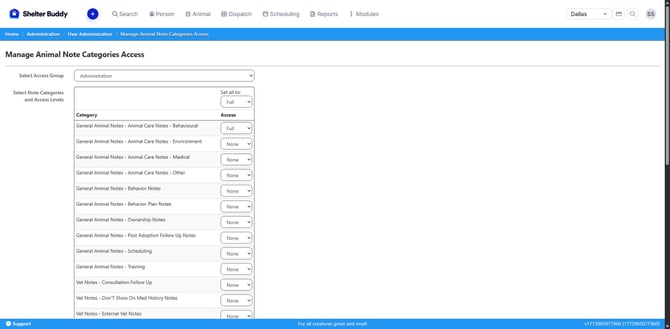
- At the top of the page, set the first access group. It will list them alphabetically.
- Below, the page will automatically show the existing categories and what level has been set for that group. They will default to "Full" at first.
- To change access to the all note categories for the whole group, use the "Set all to" drop-down at the top of the page. It will cascade that response to the whole list.
- You can also change note categories individually by setting each one manually as desired.
- When the list is set with your preferences, click [Save]
- Repeat as required for other groups until complete.