![shelterbuddy_logo.jpeg]](https://knowledgebase.petloyalty.co/hs-fs/hubfs/shelterbuddy_logo.jpeg?width=65&height=65&name=shelterbuddy_logo.jpeg)
Improvements
-
New colour scheme
-
We continue updating the color scheme to include a white background that makes pages more readable and accessible:
-
Expect changes in Bite Incident Page
-
- Dispatch Reports 21 & 34 now show attendance end time, and finalizing a job auto-ends attendance
-
Two improvements have been made to help dispatchers manage officer attendance more reliably. Reports 21 (Officer Activity Log) and 34 (Calls by Officer) now always show an attendance end time unless the officer is still actively attending. Previously, if a job was finalised while still in "Attending" status, no end time appeared — making it difficult to identify and resolve cases where an officer was stuck as "attending." Additionally, finalising a job that is still in "Attending" status will now automatically close the attendance, preventing officers from getting stuck in that state.
-
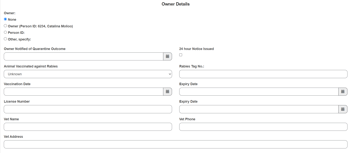
- Veterinarian section added to Bite Reports
-
Bite Reports now include a veterinarian section with free-text fields for the vet's name, address, and phone number. This supports shelters that are required to include veterinarian information on bite reports submitted to state or regional health departments.
-
- Pet Portfolio now prints link labels instead of raw URLs
-
When printing a Pet Portfolio that contains hyperlinks, the link label now prints instead of the full raw URL. Previously, long URLs would appear in the printed output, making documents harder to read.
-
Bug Fixes
-
Dispatch notes and instructions
-
A series of issues affecting dispatch notes and instructions have been resolved: dispatch notes containing angle bracket characters (e.g. from copy-pasted email addresses) were triggering an error on save — these characters are now accepted correctly; pasting content with certain special characters into Dispatch Inspection notes was causing a validation error, which is now fixed; clicking "Add Instruction" from within Inspection Details was not opening the modal as expected, which has been corrected; and attempting to edit an Ongoing Dispatch Note was showing an incorrect "Dispatch job #0 — you do not have access" error for all jobs — editing now works as expected.
-
-
Ambulance Follow-up page error for some users
-
Fixed an error on the Ambulance Follow-up page that was affecting certain users. The page was failing to authenticate the current user context when checking dispatch job access, resulting in an unhandled exception.
-
-
Required field indicators (asterisks) missing on updated white pages
-
Fixed an issue where mandatory field asterisks were not appearing on recently migrated white background pages, including the updated ID & Services page. This was caused by a CSS caching issue following the migration and affected some users depending on their browser cache state.
-
-
Error saving animals via Identification PC when breed is already entered
-
Fixed an issue where staff were unable to save animals via Identification PC (Home Again microchip workflow). The system was incorrectly prompting users to enter an animal breed even when a breed was already selected.
-
-
Report 197 returning duplicate animal records
-
Fixed an issue where Report 197 was returning some animals twice in the results, even when those animals only had a single relevant intake within the selected date range.
-
-
Adoption receipt printing a different person's address
-
Fixed an issue where adoption receipts were printing the address of a different person rather than the correct adopter's address. This was related to address data being shared across person records following a person merge.
-
-
Bite Report comments being cut off when printed
-
Fixed an issue where the Comments field on a Bite Report was being truncated on the printed output, causing information entered in the system to not appear on the printed form.
-